
Unlock the Best of Japan Directly from Your Smartphone.
Discover the essential digital tools to navigate the country like a local expert.
(日本語訳:あなたのスマホから、日本の最高の旅を解き放とう。現地のプロのように日本をスマートに巡るための、必須のデジタルツールを紹介します。)
Stop Fighting with Paper Maps!
The "Magic Three" Tools to Navigate Japan Like a Local Expert
(訳:紙のマップに振り回されるのは、もう終わり。 ローカルの達人のように日本を旅する「3つの魔法のツール」)
You Are Doing It Wrong!
(訳:実はそのやり方、間違っているかも?)
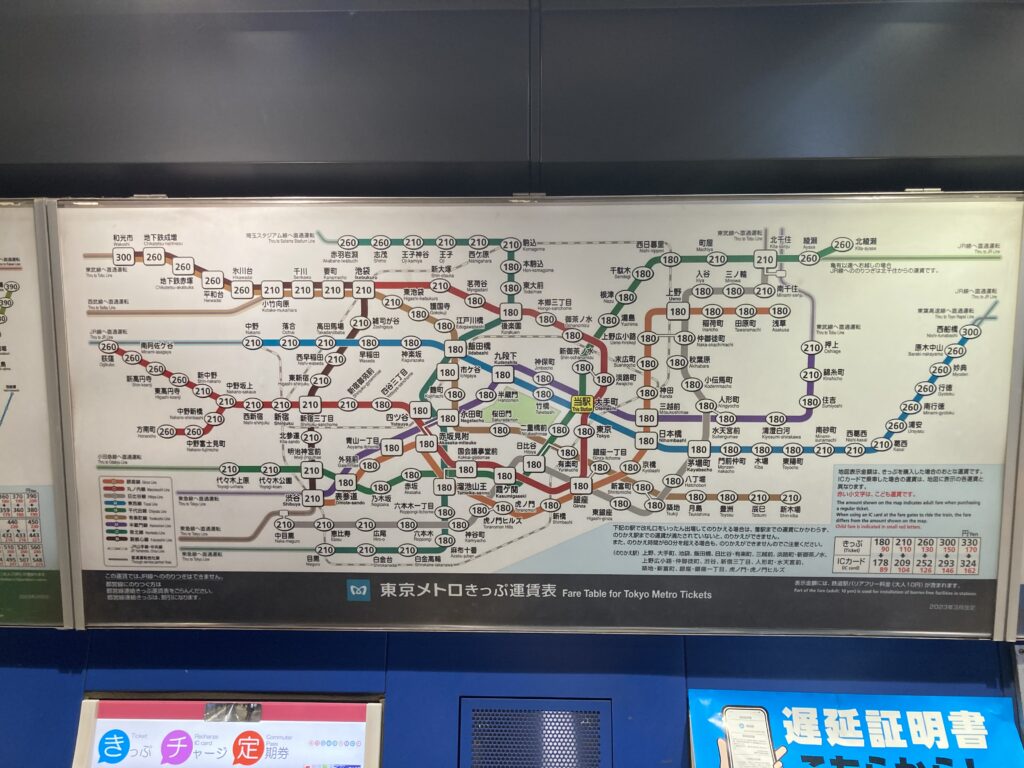
Look around any major train station in Tokyo, like Shinjuku or Otemachi. You’ll see crowds of tourists standing frozen in front of the giant fare maps above the ticket machines. They are desperately trying to find their destination, decode the tiny numbers for the train fare, and count unfamiliar Japanese coins.
(訳:新宿や大手町など、東京の主要な駅を見回してみてください。券売機の上にある巨大な運賃表の前でフリーズしている観光客の集団を目にするはずです。彼らは必死に目的地を探し、小さな運賃の数字を解読し、慣れない日本の小銭を数えています。)
Here is a secret: Japanese locals NEVER look at those giant route maps above the ticket machines.
(訳:ここに秘密があります。日本の地元民は切符売り場の上にあるあの巨大な路線図を「絶対」に見ません。)
Why? Because even for locals, those maps are overly complicated and a pain to figure out. The only people standing there are those without smartphones. Everyone else simply searches the route on their phone and glides through the gates.
(訳:なぜか? 日本人ですら、あのマップは複雑すぎて解読するのが大変だからです。あそこに立っているのはスマホを持っていない人だけ。他の人はみんなスマホでサクッと経路を検索し、スマートに改札を通り抜けています。)
If you spend 10 minutes trying to decipher the map and lining up for paper tickets every time you travel, you are losing hours of your vacation. You can travel just like a local—all you need to do is stay online and change how you travel.
(訳:移動のたびに路線図を解読しようと頭を悩ませ、紙の切符のために10分並んでいたら、せっかくの休暇を何時間も失うことになります。あなたも地元民とまったく同じようにスマートに旅ができます。必要なのは、オンライン環境を確保し、旅のやり方を変えることだけです。)
Step 1: Communication — The "Fuel" of Your Smart Trip
(訳:ステップ 1:コミュニケーション あなたの旅を加速させる「エネルギー」)
To travel like a local, you need information in real-time. Checking train schedules, using navigation apps, and translating signs all require one critical thing: a constant, reliable internet connection. Without data, Tokyo is just a giant neon labyrinth.
(訳:地元民のように旅をするには、リアルタイムの情報が必要です。電車の時刻表をチェックし、ナビアプリを使い、看板を翻訳する。これらすべてに、常に安定したネット接続という不可欠な要素が求められます。データがなければ、東京はただの巨大なネオンの迷路です。)
Ditch the Airport Lines: Get an eSIM Instantly
(訳:空港の行列にバイバイ:eSIMをその場で即時ゲット)
You don’t need to waste time lining up at airport kiosks to buy overpriced physical SIM cards or rent bulky Pocket Wi-Fi devices. With an eSIM, you can install your data plan right now—directly onto your smartphone in less than 3 minutes.
(訳:高額な物理SIMカードを買うために空港のキオスクに並んだり、かさばるポケットWi-Fiをレンタルして時間を無駄にする必要はありません。eSIMなら、今その場で、3分未満でスマホに直接データプランをインストールできます。)
Once your eSIM is active, you instantly unlock the power to navigate Japan effortlessly. Below are the top recommended eSIMs for international travelers based on speed, coverage, and price:
(訳:eSIMが有効になれば、日本をストレスなくナビゲートする力を一瞬で手に入れることができます。以下は、速度、エリア、価格をベースにした、海外旅行者に最もおすすめのeSIMです。)
eSIM Comparison Table for Japan (2026 Guide)
| Plan Style | Brand | Best For... | Data Types | Action |
| Budget / Short Stay | Ubigi | Travelers who want a stable network for just a few days at the lowest cost. | 1GB - 5GB small data plans. (Very reliable networks in Japan) | [Official Website & Plans] |
| Most Popular / Best Value | Airalo | First-time visitors who want the perfect balance of price, data size, and ease of use. | 3GB / 5GB / 10GB flexible plans. | [Official Website & Plans] |
| Unlimited / Premium | Holafly | Heavy users who want to stream videos, post Instagram Reels, and never worry about data limits. | 100% Unlimited Data (Customizable days). | [Official Website & Plans] |
Step 2: Transit — Google Maps vs. Japan Transit Apps
(訳:ステップ 2:交通 —— グーグルマップ vs 日本の乗り換えアプリ)
NAVITIME Japan Travel: [Download for iOS] / [Download for Android]
Jorudan (Japan Transit Planner): [Official App Download]
Ekitan (Japanese Only): [Official Web Search]
Once you have data, you are ready to conquer Japan's railway system. However, many tourists still get confused because they rely on the wrong tools or ignore the most important details. Here is how Japanese locals actually find their way.
(訳:データ通信さえ確保できれば、日本の鉄道システムを攻略する準備は万全です。しかし、多くの観光客は間違ったツールに頼ったり、最も重要なディテールを無視しているために、今でも混乱しています。地元の日本人が実際にどのように道を見つけているか、その方法を教えます。)
Google Maps is Your Compass, Not Your Bible
(訳:Googleマップは「コンパス」であって、「聖書」ではない)
First, open Google Maps and type in your destination. It will instantly show you which train route to take, the platform number, and the exact fare. It completely eliminates the need to look at those confusing station maps.
(訳:まずはGoogleマップを開き、目的地を入力してください。乗るべき電車のルート、ホームの番号、そして正確な運賃が一瞬で表示されます。あの紛らわしい駅の路線図を見る必要は完全にゼロになります。)
The Pro Trick: Pair It with a Japan Transit App
(訳:プロの裏技:日本の乗り換えアプリとの「二刀流」)
While Google Maps is great for general directions, local commuters often double-check with dedicated Japanese transit planners like "Jorudan" or "Ekitan (Transit Planner)".
(訳:Googleマップは全体的なルート案内に最適ですが、地元の通勤客は「ジョルダン」や「駅探」といった日本専用の乗り換え案内サービスでダブルチェックしています。)
Services like "Ekitan" are hyper-accurate for Japanese trains. They offer a great English web-based planner that works perfectly on your mobile browser without even downloading an app. These tools show you the exact minute the next train arrives, the best car to ride for a smooth transfer, and alternative routes instantly if there is a delay.
(訳:「駅探」のようなサービスは、日本の電車に対して極めて正確です。アプリをダウンロードしなくても、スマホのブラウザ上で完璧に動作する優れた英語のWeb版ツールを提供しています。これらのツールは、次の電車が何分に到着するかだけでなく、乗り換えに最適な乗車車両や、遅延時の別ルートを一瞬で教えてくれます。)
While Japanese locals commonly use Jorudan and Ekitan for their daily commutes, there is an even better option designed specifically for international tourists: NAVITIME (Japan Travel).Here are the official links and downloads for these transit services:
(訳:日本の現地の人々は普段、ジョルダンや駅探をよく使っていますが、海外からの旅行者に特化して作られた、さらに便利な選択肢があります。それが「NAVITIME (Japan Travel)」です。これらの乗り換えサービスの公式リンクとダウンロードは以下からどうぞ:)
・NAVITIME (Japan Travel): [Download for iOS] / [Download for Android]
(※外国人旅行者に最もおすすめの多言語対応アプリ)
・Jorudan (Japan Transit Planner): [Official App Download (English Supported)]
(※日本人もよく使うジョルダンの、英語対応版アプリ)
・Ekitan: [Official Website (Japanese Only)]
(※記事で紹介されている、日本人に大人気の乗り換えサービス)
【Local Expert Tip】 Surviving the Exit Labyrinth
Here is a golden rule that separate pros from amateurs: Always check the "Exit Number" before you leave the train.
(訳:プロとアマチュアを分ける鉄則がこれです。電車を降りる前に、必ず「出口番号」を確認してください。)
Major stations like Shinjuku, Tokyo, or Otemachi are massive underground mazes. If you just follow the crowd and walk out of any exit, you could end up on the completely opposite side of the station, wasting 15 minutes trying to walk back on the street. Look at your app, find the exact exit code (e.g., Exit A1, Exit B3, or West Exit), and follow the yellow overhead signs inside the station carefully.
(訳:新宿や東京、大手町などの主要駅は、巨大な地下迷宮です。ただ人の流れについていって適当な出口から出てしまうと、目的地の完全に対向側に出てしまい、地上を歩いて戻るのに15分も無駄にすることになります。アプリを見て、正確な出口コード(例:Exit A1、Exit B3、西口など)を確認し、駅の中にある黄色い頭上看板を慎重に追いかけてください。)
Step 3: Payment — Ditch the Cash with Mobile IC Cards
Now that you can navigate like a local, let’s talk about how to pay like one. Stop carrying a wallet full of heavy Japanese coins and lining up at ticket machines. Your smartphone can become your transit card in less than a minute.
(訳:地元民のように移動できるようになったら、次は地元民のように支払う方法について話しましょう。重い日本の小銭で財布をいっぱいにしたり、切符売り場で並んだりするのはもう終わりです。あなたのスマホは1分未満で交通系ICカードに変わります。)
iPhone and Android: Setup Your Suica or PASMO
You don’t need to buy a physical plastic card anymore. If you use an iPhone, you can add a digital Suica or PASMO directly through your Apple Wallet right now—even before you board your flight to Japan! For Android users, you can easily set it up via the Google Wallet app once you arrive or use an international version of the card.
(訳:もうプラスチックの物理カードを買う必要はありません。iPhoneユーザーなら、今すぐAppleウォレットから直接デジタルSuicaやPASMOを追加できます。日本行きの飛行機に乗る前でも可能です!Androidユーザーも、日本に到着したあとにGoogleウォレットアプリを通じて簡単にセットアップしたり、インターナショナル版のカードを利用したりできます。)
Once added, you just tap your phone against the ticket gate. You don’t even need to wake up your phone or open an app. Just tap and go!
(訳:一度追加すれば、スマホを改札機にタッチするだけです。スマホの画面を起動したり、アプリを開いたりする必要すらありません。タッチして進むだけです!)
Quick Tip: How to Top Up and Fix Charge Errors
You can instantly top up (charge) your digital card using the credit card registered to your phone. However, a common trap for international travelers is that some foreign credit cards (especially Visa) sometimes get blocked by Japanese security systems when charging inside the app.
(訳:スマホに登録されているクレジットカードを使って、デジタルカードにその場でチャージ(入金)できます。しかし、海外旅行者によくある罠として、アプリ内でチャージしようとすると一部の海外クレジットカード(特にVisa)が日本のセキュリティシステムに引っかかってブロックされることがあります。)
If your card fails, don't panic! You can easily charge your mobile Suica/PASMO with cash (Japanese Yen) at any Seven-Bank ATM located inside Seven-Eleven convenience stores, or at green ticket machines inside train stations. Simply place your phone on the reader, insert cash, and you are ready.
(訳:もしカードがエラーになってもパニックにならないでください!セブン-イレブン内にあるセブン銀行ATMや、駅の緑の券売機で、現金(日本円)を使ってモバイルSuica/PASMOに簡単にチャージできます。スマホを読み取り台に置き、現金を投入するだけで完了です。)
Step 4: Language — Put an AI Translator in Your Pocket
【Step 4:言語】カメラ翻訳という「翻訳機」をポケットに
iPhone Users: The Built-in "Translate" App is Your Best Friend
iPhones come with Apple's native "Translate" app pre-installed. It handles everything in one place: "Camera mode" to read signs, "Conversation mode" to talk with station staff, and "Text mode" for precise typing.
(訳:iPhoneユーザー:純正の「翻訳」アプリが最強の味方。iPhoneにはApple純正の「翻訳」アプリが標準搭載されています。カメラをかざして看板を読む「カメラモード」、駅員さんと対話ができる「会話モード」、正確に伝える「テキストモード」のすべてがこのアプリ1つで完結します。)
Android Users: Check "Google Translate" First
Many Android devices have Google Translate pre-installed. If yours doesn't, download it before arriving. The real-time camera translation is essential for decoding Izakaya menu
(訳:Androidユーザー:まずは「Google翻訳」をチェック。多くのAndroid端末にはGoogle翻訳が最初から入っています。入っていない場合は、日本に着く前にダウンロードしておきましょう。特にリアルタイムのカメラ翻訳機能は、居酒屋のメニュー解読に必須です。)
Smart Communication: Just Show Your Screen
Simply showing your translated screen to staff breaks the language barrier. Add a polite "Sumimasen," and locals will be happy to guide you in the right direction.
(訳:「見せるだけ」で伝わる、スマートなコミュニケーション。翻訳した画面を駅員さんに見せるだけで、言葉の壁は消えます。丁寧な「すみません(Sumimasen)」を添えれば、日本人は喜んであなたを正しい方向へ導いてくれます。)
Conclusion: Welcome to Smart Japan!
【結論:スマートな日本へようこそ!】
Japan is one of the most beautiful and exciting countries in the world, but its complex railway system can easily overwhelm anyone. Remember, you don’t need to be a ninja to navigate Tokyo like a pro—you just need to be smart.
(訳:日本は世界で最も美しくエキサイティングな国の一つですが、その複雑な鉄道システムは誰をも圧倒してしまいます。忘れないでください、プロのように東京を移動するのに忍者になる必要はありません。ただ、スマートになればいいのです。)
By setting up your "Digital Travel Kit" before you start your day, you can completely skip the stress that 90% of other tourists face:
(訳:お出かけ前に「デジタル旅行キット」をセットアップしておくだけで、他の観光客の90%が直面するストレスを完全にスキップすることができます。)
Step 1: Get an eSIM to secure your constant internet connection.
(常にネットに繋がるeSIMを確保する)
Step 2: Use Google Maps and Ekitan/Jorudan to check exact platforms and exit numbers.
(Googleマップと駅探・ジョルダンを使い、正確なホームと出口番号を確認する)
Step 3: Tap with Mobile Suica/PASMO so you never have to buy a paper ticket again.
(モバイルSuica・PASMOでタッチして、二度と紙の切符を買わないようにする)
Step 4: Keep Apple Translate or Google Translate ready to instantly read any Japanese signs with your camera.
(Apple翻訳やGoogle翻訳を用意して、カメラでどんな日本語の看板も瞬時に読めるようにする)
Once you are online, Japan becomes an incredibly friendly and open country. You can go anywhere, eat anything, and travel with 100% confidence. Stop looking up at those giant, confusing station maps, step through the ticket gates with a single tap, and enjoy every single minute of your amazing journey!
(訳:オンラインになりさえすれば、日本は信じられないほど親切でオープンな国になります。どこへでも行けて、何でも食べられて、100%の自信を持って旅ができます。あの巨大で紛らわしい駅の路線図を見上げるのはもう終わりにして、ワンタップで改札を通り抜け、あなたの素晴らしい旅の1分1秒を全力で楽しんでください!)